


FREE SHIPPING!
On All Orders Over $200
On All Orders Over $200
How to Order
To Order a Garment:
- Find & Select the Garment that you would like.

- Select the Color, Size and Quantity of the garment that you would like.
- Click on the Add to Cart button to add this item to your shopping
cart. Your shopping cart should be displayed with your items found in an itemized
list. If you would like to add embroidery to your garment click on the Keep
Shopping button. After you click on the Keep Shopping button you will
return to the item that you selected. Click on any of the embroidery options
(e.g., Embroidered Text, Embroidered Graphic, Embroidered Text & Graphic)
provided for your item to order embroidery to be placed on your garment.
When you are ready to return to your shopping cart select the View Cart text at the very top of the page.
Note: If you would like to order additional Colors and Sizes simply add them to your cart separately.
To Order Embroidery:
- Select the Embroidery (e.g., Embroidered Text, Embroidered Graphic, Embroidered Text & Graphic) that you would like.
- Complete each of the fields that are displayed for your embroidery such as: Embroidered Text, Thread Color, Font, Graphic Name and Graphic ID Number.
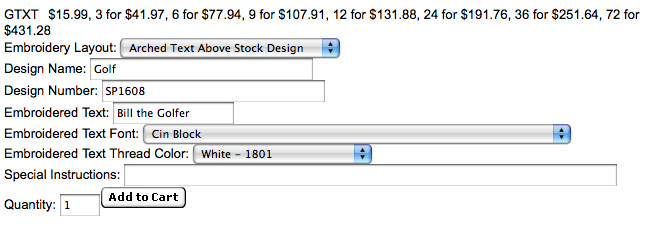
The graphic Design Name and Design Number can be found below your selected design.

- Click on the Font Styles, Thread Colors or Stock Design Collection/Graphics hyperlinks to view all available embroidery choices.


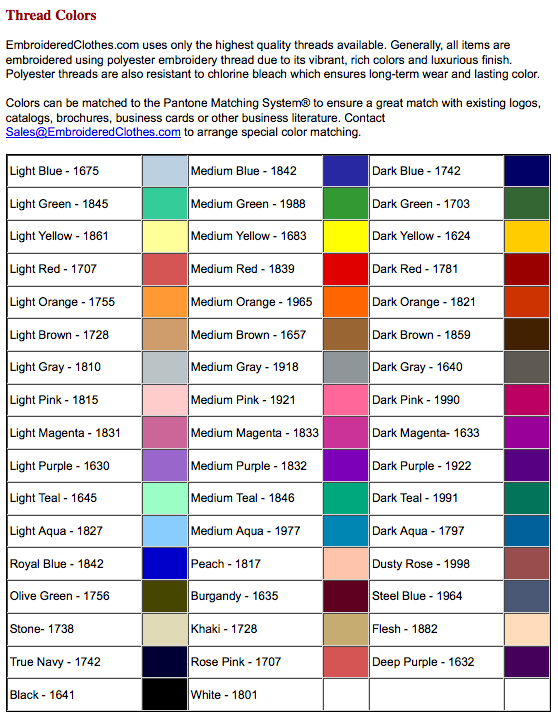
- Enter the Number/Quantity of Embroidered garments that you would like. NOTE: If you would like different embroidery for multiple items ordered please enter a note in the Special Instructions field indicating which embroidery you would like on which garment. For example, in the Special Instructions field enter a note such as "Place on Charcoal hat" or "Place on Size L, Black sweatshirt".
- Click on the Add to Cart button to add this item to your shopping cart. Your shopping cart should be displayed with your items found in an itemized list. NOTE: If you would like to order additional Colors and Sizes simply add them to your cart separately.
- When you are ready to return to your shopping cart select the View Cart text at the very top of the page.





Copyright © 2002-2013 www.EmbroideredClothes.com. All Rights Reserved.